
• Live Chat
  • Report an IT Security Incident
  • Request Help
  • Help & Support
    • Live Chat
    • Request Help
    • Track a Ticket
    • Knowledge Base
    • AI Toolkit
    • User Training
    • George Mason Endpoint Information and Resources
    • Computer Labs & Classrooms Information
    • Getting Started
    • Working/Learning Remotely
  • Service Catalog
    • ITS General Help
    • Accounts & Access
    • Communications & Collaboration
    • Computers & Software
    • Information Security
    • Network & Internet Services
    • Professional Services
    • Research Computing
    • Teaching & Learning
    • University Applications
  • About ITS
    • Our ITS Team
    • Strategic Plan
    • Annual Reports
    • Awards
    • Student Employment
  • Working with ITS
    • Architectural Standards Review Board
    • Banner Admin
    • Business Intelligence
    • Data Governance
    • Enterprise Data Integration Services (EDIS)
    • IT Business Analysis
    • IT Security Office
    • Projects & Project Management
    • Technical Business Solution Intake Request Process
  • Alerts & Outages
    • Unplanned Outages
    • Phishing Alerts
    • Maintenance
    • After Action Reports
    • Archives
    • ITS Alerts Sign Up
  • News
    • Bits & Bytes Signup
    • Bits & Bytes Submissions
    • Bits & Bytes Archive
    • Spotlights
    • Bulletins
George Mason University
  • Live Chat
  • Report an IT Security Incident
  • Request Help
X Hide

Information Technology Services

Skip to content
  • Help & Support
    • Live Chat
    • Request Help
    • Track a Ticket
    • Knowledge Base
    • AI Toolkit
    • User Training
    • George Mason Endpoint Information and Resources
    • Computer Labs & Classrooms Information
    • Getting Started
    • Working/Learning Remotely
  • Service Catalog
    • ITS General Help
    • Accounts & Access
    • Communications & Collaboration
    • Computers & Software
    • Information Security
    • Network & Internet Services
    • Professional Services
    • Research Computing
    • Teaching & Learning
    • University Applications
  • About ITS
    • Our ITS Team
    • Strategic Plan
    • Annual Reports
    • Awards
    • Student Employment
  • Working with ITS
    • Architectural Standards Review Board
    • Banner Admin
    • Business Intelligence
    • Data Governance
    • Enterprise Data Integration Services (EDIS)
    • IT Business Analysis
    • IT Security Office
    • Projects & Project Management
    • Technical Business Solution Intake Request Process
  • Alerts & Outages
    • Unplanned Outages
    • Phishing Alerts
    • Maintenance
    • After Action Reports
    • Archives
    • ITS Alerts Sign Up
  • News
    • Bits & Bytes Signup
    • Bits & Bytes Submissions
    • Bits & Bytes Archive
    • Spotlights
    • Bulletins

How can ITS help you?

Our services are designed to help you succeed at Mason—
search our services, knowledge articles, how to guides, FAQs, and more.

Knowledge Base

Home > Help & Support > Knowledge Base > Security > 2FA Information > New Duo Mobile Verification Code

New Duo Mobile Verification Code

As of May 2024, users of George Mason University’s Two-Factor Authentication (2FA) application, Duo Mobile, have additional security features to improve protection against phishing attacks. Users now verify their identity through a verification code for Push Notifications.

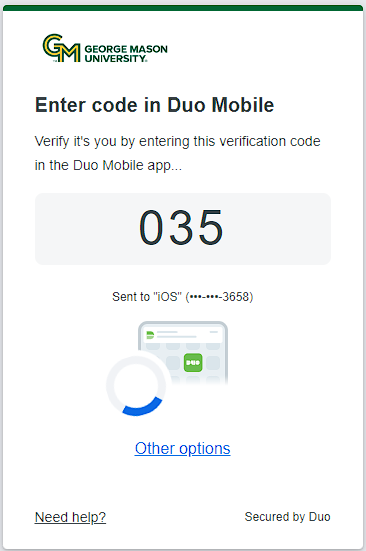
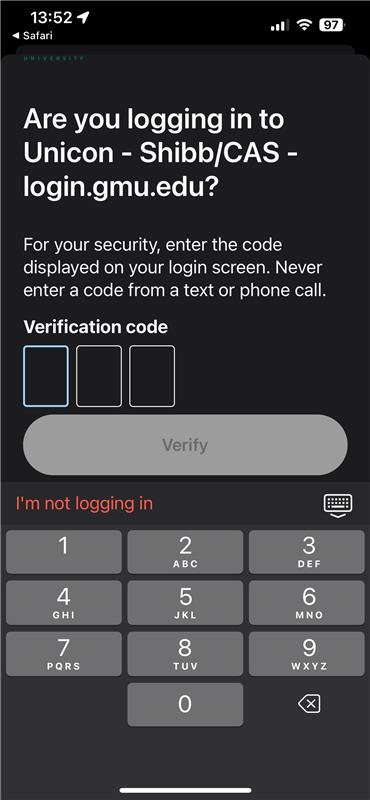
The update improves security by requesting a three-digit code in addition to approving access through the Duo app. The change requires deliberate action by users before allowing access to their accounts and data. Instead of verifying identities by selecting the “Deny” or “OK” button on the Duo app, users will be provided a three-digit code to access applications.

The introduction of the code allows you to connect to the system you are accessing with the Duo Push Notification. This addresses ‘push fatigue’ when some users casually approve a Duo push, even if they did not request it. The addition of the verification code protects you from approving login requests not made by you and helps keep your accounts and information safe.

When you log into Mason applications, you will see this
In the Duo app on your phone, you will be asked to put in the three-digit code to verify your identity
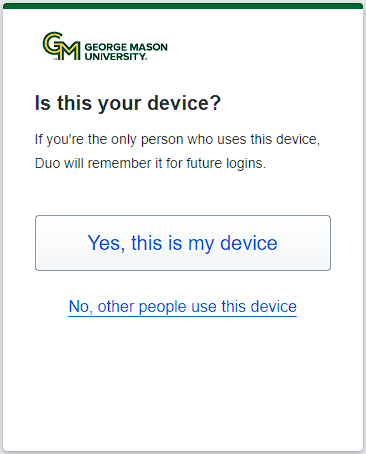
If the device you are authenticating on belongs to you, clicking yes will provide you access for 7 days
 

If you have questions or need assistance, contact ITS Support at 703-993-8870 or request help.

Last modified: February 11, 2025

Previous

Why am I seeing the message “Access denied. Duo Security does not provide services in your current location” in the Duo Prompt?

Next

How to Update Your Emergency Bypass Email Address

Related articles

  • How to Reactivate a Smartphone and Link to Duo Mobile
  • How to Use the Yubikey (Web Apps)
  • How to Set Up & Enroll a Yubikey
  • How to Request a Bypass Code (Emergency)
  • Request a 2FA Account Reset

Get Started at Mason

Whether you are a student, faculty, staff member, or a guest visiting the Mason campus, we have resources to help get you started.

READ MORE

Quick Links

Patriot Pass Password Reset
Create a Ticket
Track a Ticket
PuTTY
Cisco AnyConnect VPN

READ MORE

Explore IT Services

A B C D E F G
H I J K L M N
O P Q R S T U
V W X Y Z #

I T S Logo

© 2024 George Mason University
4400 University Drive
Fairfax, Virginia 22030

Follow Us
location pin for in-person IT support   @GeorgeMasonITS
location pin for in-person IT support   @georgemasonits
ITS Support 24/7
   703-993-8870
   Live Chat
  • Webmaster

The MASON-SECURE Wi-Fi network will be permanently shut down on Friday, December 19, 2025. To ensure uninterrupted connectivity, all campus Wi-Fi users should switch to eduroam. For details, see MASON-SECURE Retirement FAQs.