
Information Technology Services

Required Restart for Windows Computers

Information Technology Services (ITS) reports indicate that several Mason-managed Windows computers have not been restarted after receiving Windows updates earlier this month. Beginning next week, ITS will send the following message directly to the Mason-managed Windows computers that require a restart:

Information Technology Services (ITS) reports indicate that your computer has a pending restart to complete the installation of Windows security updates. This computer will not be fully secure until a restart occurs. If this computer still requires a restart by Friday, July 3, an automatic restart will be scheduled. Once the restart is scheduled, an 8-hour countdown will appear to give you time to prepare. If you have questions or need assistance, please contact the ITS Support Center at 703-993-8870 or [email protected].

Once you schedule the restart, an 8-hour countdown will appear to give you time to prepare for the restart.
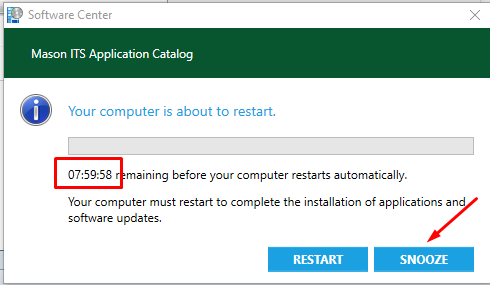
If you select SNOOZE, a pop-up reminder will appear 4 hours later. If you select SNOOZE again, the pop-up will disappear and will start a 15-minute countdown timer to an automatic restart.

ITS routinely pushes updates to managed computers but requires a restart for installation to complete. Adhering to the proper process to complete necessary updates is vital to ensuring the security of computers and the Mason network. In the future, ITS will send this same message to Mason-managed Windows computers and enforce a required restart one week after updates have been applied.

ITS also strongly recommends that Windows users on personal computers regularly restart their computers after receiving updates.

If you have any questions, please contact the ITS Support Center at 703-993-8870 or [email protected].

Symantec Endpoint Protection Patching

Information Technology Services (ITS) is sending an out-of-band update to patch a vulnerability for Symantec Endpoint Protection clients. Installation of this update will begin on the evening Thursday, June 18 to all MESA users with the option to defer up to three times.

This version should be compatible with Windows 7 and later desktop OS as well as High Sierra and later for Mac OS.

Please see What’s New for Symantec Endpoint Protection 14.3 for more details.

If you have any questions or need additional information, please contact the ITS Support Center at 703-993-8870 or [email protected].

Two-Factor Authentication for Office 365

As a continuation of our effort to standardize and secure technology services for the Mason community, beginning the week of June 1 and continuing through the summer, Information Technology Services (ITS) will complete the release of Two-Factor Authentication (2FA) and Microsoft Teams for the remaining Office 365 (O365) employee accounts (email, calendar and OneDrive for Business, etc.). Nearly 3,000 faculty and staff already use 2FA for O365.

If you are currently using 2FA for O365:

  • No further action is required
  • MS Teams is available for you to use; See https://its.gmu.edu/microsoft-teams

If you are not currently using 2FA for O365:

  • ITS will notify you before the change is made to your account.
  • Ensure you are using Microsoft Outlook, the supported method to access your Mason email and calendar. If you are not, you should make the change now. You do not need to wait for your account to be upgraded with 2FA. Supported methods are:
    • Mobile Devices: Outlook Mobile for Android and Apple phones
    • Desktop Applications: Outlook 2016 (Supported), Outlook 2019 (Recommended)
      • Mason-managed Windows: Available via Software Center (VPN required)
      • Mason-managed Mac: Available via Mason Self-Service
      • Unmanaged Mason-owned systems: Contact the ITS Support Center for assistance
    • Web: Outlook on the web (http://mso365.gmu.edu)
      • Available from any browser on any device
    • On May 15, ITS contacted those who are using methods other than MS Outlook to access their email. If you require it, ITS will provide assistance making the change.

To learn more about how you can prepare or to enroll early and get access to MS Teams now, see Two-Factor Authentication (2FA) for Office 365.

Additional Background:
ITS is standardizing on Outlook, the Microsoft Office 365 email and calendar applications, to facilitate seamless delivery of services and offer a high-quality user experience. As Mason continues to expand its IT and collaboration service offerings, we recently upgraded our Microsoft License, which provides additional Office 365 features and functionality to faculty and staff. The Microsoft collaboration tool set allows for modern, secure, and standardized access to file shares, chat, presence, as well as a suite of new collaboration tools. This change does not apply to accounts on the MasonLive student email system.

Unsupported email clients are not always compatible with 2FA; you will need to upgrade to a supported client to ensure no disruption of service. For additional information, see the list of supported email and calendar clients on the ITS website.

If you have questions or need assistance, please contact the ITS Support Center at 703-993-8870 or [email protected].

Zoom Now Available at Mason

To support George Mason University’s response to COVID-19, Information Technology Services (ITS) has made Zoom Pro accounts available for all faculty and staff to support online teaching and remote work and Zoom Basic accounts for all students to support online learning. Zoom is a cloud-based web conferencing tool for video and audio conferencing, collaboration, chat, and webinars across mobile devices, desktops, telephones, and room systems. Pro accounts allow hosting of up to 300 participants for a maximum of 24 hours per meeting.

For information about Zoom, visit the Zoom service catalog entry.

To use Zoom at Mason

Note: Ensure you are logged out of Zoom on all devices before moving forward with these steps

  • Go to gmu.zoom.us/signin
  • You will be taken to a Mason authentication screen
  • Log in with your Mason NetID and Patriot Pass Password
    Note: Users with Two-Factor Authentication (2FA) with Office 365 may be prompted to authenticate
  • You are now logged in to your Mason Zoom account

For additional resources and training, please visit Zoom’s Help Center at https://support.zoom.us/hc/en-us.

If you have questions or need assistance, please contact the ITS Support Center at 703-993-8870 or [email protected].

Increase in Phishing Emails

The Mason community is experiencing an increase in phishing designed to defraud faculty and staff.

Cybercriminals are using names and fake email addresses of senior officials to ask faculty and staff to purchase gift cards. For example, the fake address may use a senior official’s name [DOT]gmu[DOT]edu[AT]gmail[DOT]com to confuse or mislead recipients. The display name may be correct. The initial email uses subjects like ‘available’ or ‘urgent request’ to get recipients to respond back. They may ask recipients to purchase gift cards and respond with the card information to cash in the cards.

Please take the time to evaluate the sender’s email address to determine if it is a legitimate [AT]gmu.edu address. It should be an email you are normally expecting.

What you should do

If you receive one of these emails, please do not respond. Report the email to the ITS Support Center at 703-993-8870 or [email protected]. Please be prepared to provide the original malicious email.