
Based on user feedback that some of the Finance reports worked differently than others, we underwent an effort to standardize the look and feel of several dossiers under the folder Patriot Reporting > Shared Reports > Finance. Paths listed below are relative to the Finance folder.
Our focus was on improving and standardizing the filtering options, documentation, and naming. Data was not added or removed from reports. However, we did move, rename, or remove a few reports when we became aware they were not working well for users. The following changes will be implemented on August 14th. The sections below provide the details of the changes.
- Reports that were Moved or Removed – lists reports for which more major changes were made
- Standardization Changes Made to Dossiers – describes the details of changes made to the dossiers
- Dossiers to Which Standardization Changes Were Applied – lists the reports to which the changes were applied
Reports that were Moved or Removed
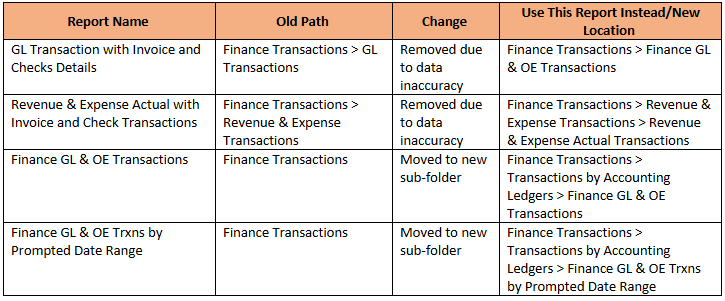
Standardization Changes Made to Dossiers
- New Mason branding and color palette applied
- Standardized naming of chapters and pages
- Ensured visualization titles were less than 60 characters to avoid truncation on low-resolution screens
- Formatted money columns
- 2 decimal points for transaction reports
- Nearest dollar for summary reports
- Filter panel
- All FOAPAL elements have both code and description, code first, description second, and are sorted by code
- Removed any redundant attributes from filter panel, e.g., Acct L5 and Acct, Acct L6, etc.
- Placed transaction FOAPAL elements, e.g., Fund, Org, Acct, at the bottom of their respective hierarchies
- Placed Cardinal attributes at the top of their respective hierarchy
- Linked any filters to other chapters when possible, so selections are set once and apply to all chapters
- Fiscal Years: Always sort descending with most recent year at top
- Grids
- Placed attributes to identify relevant time periods on the grid
- Fiscal Years: Sorted descending with most recent year on left or top
- Totals placed at the bottom (except for Outline view pages)
- Outline view pages
- Ensured that totals are at top
- Ensured all levels have totals
- Help Page
- Ensured all dossiers have one and that the content is consistent
- Links to training and support tickets are now on the project page, not individual dossiers
- Descriptions
- Created description for each folder describing reports therein and which users can access it
- Ensured each dossier has a description of content and who the targeted audience is
Dossiers to Which Standardization Changes were Applied
The dossiers below are listed according to the folder in which they reside.
Folder: Finance SummaryBudget vs Actual
Dossiers within that folder:
- Budget vs Actual YTD by College and Dept
- Budget vs Actual YTD Revenue and Expense by Fund
- Budget vs Actual YTD Summary
- Fund Balance Summary
Finance SummaryBudget:
- Budget History by Fiscal Year
- Permanent and Revised Budget (Summary and Detail)
Finance SummaryGASB Accrual Basis Financials:
- GASB Balance Sheet
- GASB Profit and Loss Statement
- GASB Profit and Loss vs Chart of Accounts
Finance SummaryGeneral Ledger:
- GL Accounts Balance
Finance SummaryStudent Finance Accounting:
- Student Finance Accounting by College and Term
- Student Finance Accounting by Student Characteristics
Finance Transactions:
- Finance GL & OE Transactions – moved to new sub-folder (Finance TransactionsTransactions by Accounting Ledgers)
Finance TransactionsRevenue & Expense Transactions:
- Revenue & Expense Actual Transactions
- Revenue & Expense Budget Transactions
Finance TransactionsRevenue & Expense TransactionsRev & Exp – Budget, Actual & Encumbrance Trnx by Org:
- Rev & Exp – Budget, Actual & Encumbrance Trnx by Org