
Datasets Source
From a data-source perspective, MicroStrategy reporting uses two types of datasets:
- Pre-loaded datasets (cubes), which are loaded into memory for improved performance
- Direct-query datasets, which retrieve data directly from the data warehouse
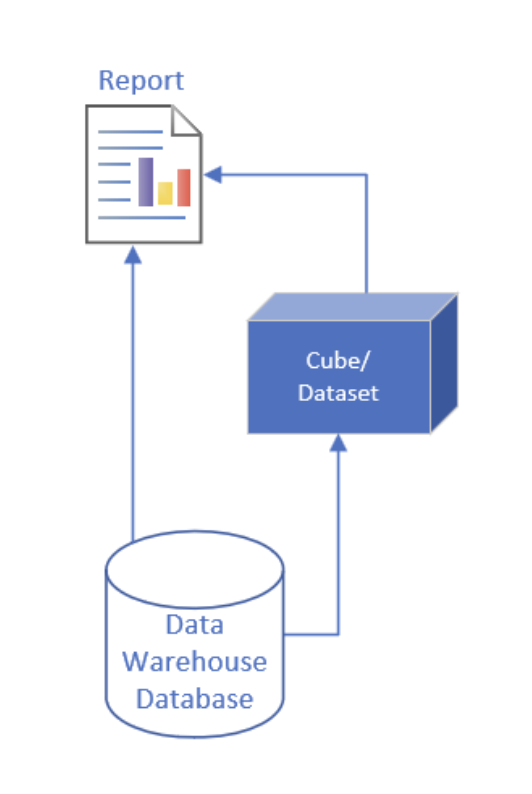
How to Determine the Source of a Dataset
Within a dashboard (or dossiers – which provides interactive visualizations), you can determine whether a dataset is sourced from an in-memory cube or queried directly from the data mart.
Step 1
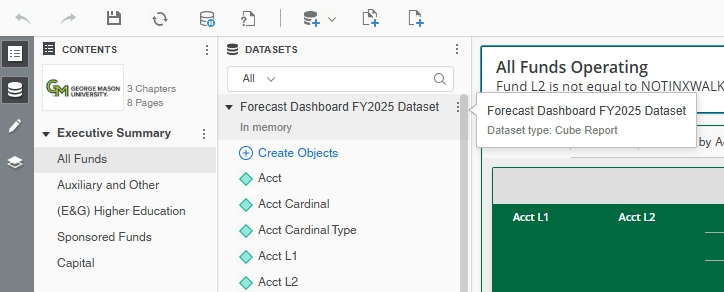
Open the Dataset panel by clicking the database icon ( ) in the left-side navigation menu.
Step 2
Hover over the dataset name. A pop-up message will display the dataset name and Dataset Type as either Standard Report or Cube Report.
- Datasets that query the data warehouse directly are labeled as Standard Report.
- Datasets that use data from an in-memory cube are labeled as Cube Report. To view this information:

Finance Data Refresh Schedule
The Finance data mart in the data warehouse is refreshed twice daily according to the following schedule:
- Nightly Refresh – begins after midnight and typically completes by 3:30 a.m.
- Noon Refresh – begins after 12:00 p.m. and typically completes by 1:30 p.m.
Pre-loaded datasets(cubes) are refreshed after each Finance data mart update. As a result:
- Reports that query the data mart directly reflect the most current data as soon as the data mart refresh is complete.
- Reports using the pre-loaded datasets(cubes) reflect the latest data once the corresponding cube refresh has completed.