
Process Owner
IT Risk & Compliance
Document Control Number
ITS.ITRC-PRS002
Document Version
2.5
Last Reviewed Date
9/25/2025
FOIA Exempt?
No
Purpose
Brief Description of the Process
This document describes the process for delivering security awareness training to the employees, contractors, and affiliates within George Mason University. The process document also articulates the use cases that will be considered ‘Optional’ (IT Security Awareness Training is delivered, but users are not locked out for non-compliance), ‘Exceptions’ (use cases that are temporarily exempted until the next cycle), and any other use cases that may be captured for additional analysis or complexity.
Objective of the Process
- AT-1: Policy and Procedures
- AT-2: Security Awareness
- AT-3: Role-Based Security Training
- AT-4: Security Training Records
Importance of the Process:
This document provides an overview of the IT Security Awareness Training (ITSAT) program at George
Mason. It discusses how ITSAT is administered, enforced, and monitored annually.
Except for the groups that have been vetted by the ITS management team and designated as “Optional,”
this process applies to all university employees, contractors, and affiliates. Users in the groups
designated as optional are not required to do the General ITSAT or the Role-Based ITSAT, but these
trainings are still available to them if they choose to complete them.
Note to All Users
Please notify the IT Risk & Compliance team of any unique use cases or situations that require additional analysis by submitting TeamDynamix tickets.
Scope
This process is critical in educating the George Mason community and raising awareness about protecting the university’s IT systems and data from malicious attempts to compromise the confidentiality, integrity, and availability of sensitive systems and information by ensuring that its employees, contractors, and affiliates are aware of their roles and responsibilities in protecting systems and sensitive information at the university.
COMPLIANCE AND STANDARDS
- IT Security Standard
- University Policy Number 1114, Data Stewardship
- University Policy Number 1301, Responsible Use of Computing
- University Policy Number 1311, Information Technology Security Program
DEFINITIONS AND ACRONYMS
- G-Number: This is a George Mason Identification Number that uniquely identifies a user.
- IAM: Identity and Access Management
- ITSAT: IT Security Awareness Training
- LMS: Learning Management System
- Net ID: A George Mason NetID (username) is a unique personal identifier that enables user to access online systems that use the Patriot Pass Password Management System. It serves as the user’s login to many university computing and networking services and also determines the user’s George Mason email address, which is [email protected].
- Training Participants: Users are George Mason employees, contractors, and affiliates.
- Users: Users are George Mason employees, contractors, and affiliates.
Titles and department names are subject to organizational changes.
Process Overview
The following diagram describes the password enforcement code logic as well as the admin unlock process after a user has been locked out after three attempts.
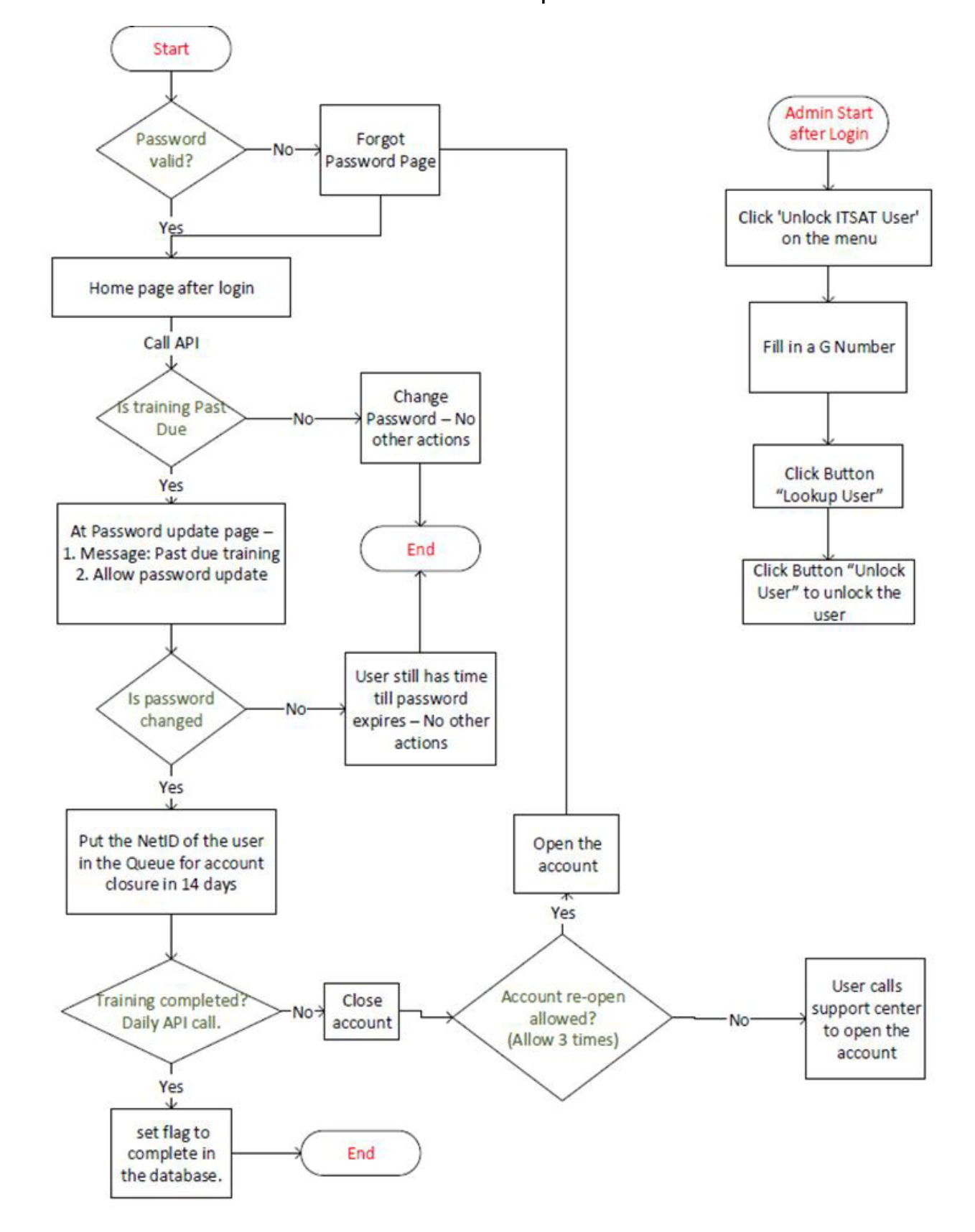
ITSAT Process Review Flow
- User starts login process.
- System checks whether the password is valid.
- If No, user goes to the Forgot Password Page.
- If Yes, user reaches the Home page after login.
- An API call checks whether training is past due.
- If No, user may change the password and no further actions occur.
- If Yes, the password update page displays a past-due training message and allows the password to be updated.
- System checks whether the password was changed.
- If No, user retains access until password expiration and no further action occurs.
- If Yes, the user’s NetID is placed in a queue for account closure in 14 days.
- A daily API call checks whether training has been completed.
- If Yes, a completion flag is set in the database and the process ends.
- If No, the account is closed.
- System checks whether account reopening is allowed (maximum three times).
- If Yes, the account is reopened.
- If No, the user must contact the support center to reopen the account.
ITSAT Admin Process Flow
- Admin logs in.
- Selects Unlock ITSAT User from the menu.
- Enters a G Number.
- Selects Lookup User.
- Selects Unlock User to unlock the account.
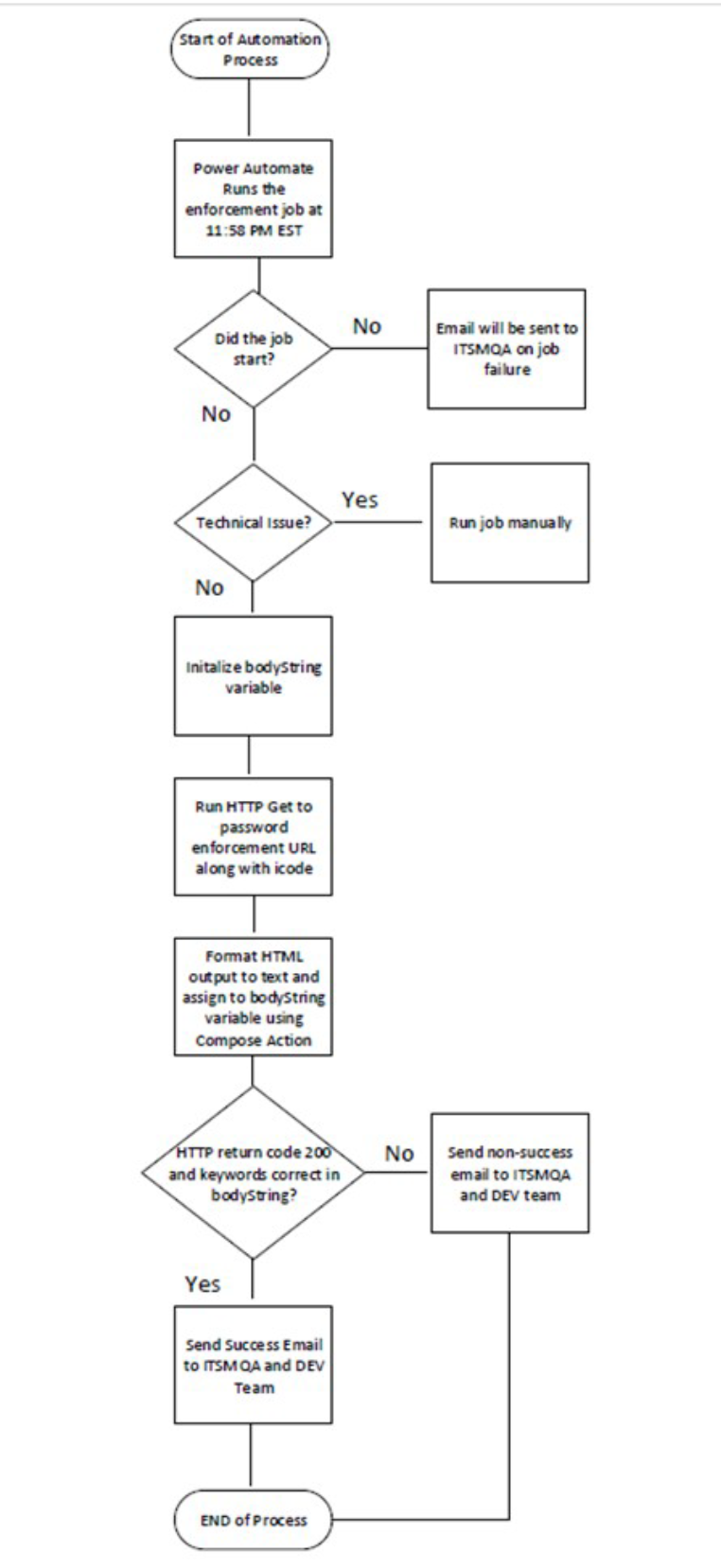
Daily Power Automation Flow
- Start of automation process.
- Power Automate runs the password-enforcement job at 11:56 PM EST.Decision:
- Did the job start?
- No: Send email to ITSMQA indicating job failure.
- If not a startup failure, continue to technical issue evaluation.
- Decision: Technical Issue?
- Yes: Run the job manually.
- No: Initialize the bodyString variable.
- Run an HTTP GET request to the password-enforcement URL with the appropriate code.
- Convert the HTML output to text and assign it to the bodyString variable using a Compose action.
- Decision: Did the HTTP request return code 200 and are the required keywords present in bodyString?
- Yes: Send a success email to ITSMQA and the DEV Team.
- No: Send a non-success email to ITSMQA and the DEV Team.
- End of process.
George Mason administers and monitors an annual ITSAT program to ensure that all employees, contractors, and affiliates who have access to George Mason systems take General ITSAT, which is administered through the enterprise LMS. Participants in this training learn how to reduce risks, improve safety and security online, learn about applicable compliance requirements, and recognize possible threats. Those with privileged access to systems are also given access to a role-based training program, and users with access to HSD receive a separate training. The following is a description of each training type:
The General ITSAT is a high-level security training that is provisioned for most George Mason employees, contractors, and affiliates.
The Role-Based ITSAT is assigned according to user roles and linked to specific LinkedIn Learning courses. These users are identified based on manual review of functional roles and responsibilities (e.g., system administrators, database administrators, developers) for now by ITS Management. There is a strategic program placeholder planned for an overarching Identity and Access Management (IAM) program that will potentially replace this manual curation process in the target state.
The HSD Training is administered via video and is signed and dated by individuals who are identified to potentially have access to the HSD as defined within the University Policy Number 1114 Data Stewardship. These users have access to Admin Apps in the Banner system. In addition, this training may also be assigned to any other users as needed or requested, such as the Executive Vice President for Finance’s leadership team. Supervisors have access within the LMS to assign training to staff reporting to them, as well.
Establishing Curriculum
- IT Risk & Compliance reviews available modules in SANS and LinkedIn Learning to identify and catalog a curriculum. It is recommended to do this review annually.
- IT Risk & Compliance shares the curriculum with the LMS administrator.
Establishing Training Criteria for Training Participants
- IT Risk & Compliance performs specific use case reviews to identify department functions and responsibilities that potentially require a user to have privileged access to the network, systems, or data.
- IT Risk & Compliance creates user lists based on reports from the LMS and Banner information.
- IT Risk & Compliance assigns the appropriate specialized training assignments (Role-Based ITSAT and HSD Training) in the LMS for each user. In this step, IT Risk and Compliance consults with the IT Directors to confirm that the selected training is relevant for the role and function the staff perform.
Automated Provisioning for General ITSAT
Any new human users added to Banner who meet the criteria of being an employee, affiliate, or contractor and have a new/updated start date are assigned the General ITSAT.
Reviewing and Approving Training Exceptions
- Exception requests are sent by the manager, IT Director, or the user to the IT Risk & Compliance team via email or through a TeamDynamix ticket. Equivalency credit may be granted if the user has completed a training (such as the New Employee ITSAT) recently. Exceptions and equivalencies are reviewed by IT Risk & Compliance.
- Exceptions and equivalencies are received, reviewed for approval, and recorded in TeamDynamix (ITSM tool) by IT Risk & Compliance. The LMS Administrator may also evaluate and grant equivalency.
- An approved exception is noted on the tracker at ITSAT Exceptions and Equivalencies.xlsx.
- The LMS Administrator updates the tracker and processes the corresponding TeamDynamix ticket.
Accessing Training by the Newly Hired and Existing University Employees, Contractors, and Affiliates and Enforcing Training Compliance
- Communication and outreach outputs are sent by ITS Communications and Marketing to users, instructing them to complete the assigned training within the specified timeframe.
Newly hired faculty, including administrative, instructional, research, and adjunct, can access the university’s enterprise LMS up to 90 days prior to their start date, if their position is active in Banner and their NetID and password are active. They have 14 days to complete the required training.
Newly-hired classified, wage, and affiliates are able to log in one day after their start date. They have 14 days to complete the required training. - Newly-hired and existing employees, contractors, and affiliates access the university’s enterprise LMS to start and complete the training
- If the user completes the training, the user receives a certificate within the LMS, and no further action is needed until the next training cycle.
- If the user fails to complete the training by the due date assigned, then on their next semi-annual password reset, the reset will last only 14 days, thereby enforcing compliance. Users get three (3) opportunities in 14-day increments to comply, and failure to meet the requirement by the end of the last (i.e., the third 14-day block), they are locked out. Their NetID account is updated to cut off access to NetID-associated systems. The user then needs to call the ITS Support Center, and the ticket is escalated to the IT Risk & Compliance team, who then works with the user and their manager to have them meet the compliance requirement.
- If, for urgent needs (e.g., enter hours in timesheet, approve timesheets, create class schedule, submit academic work), a disabled NetID user needs access to NetID- associated system(s), they call the ITS Support Center. The ITS Support Center creates a TeamDynamix ticket. The ITS Support Center enables the NetID and notifies the user that they have 14 days to complete the training; otherwise, the NetID will be disabled.
Re-enabling Accounts
The technical details for how accounts are disabled and re-enabled can be found here. These steps provide details on both scenarios where a non-compliant user resets the password once, takes all mandatory IT security awareness training, or does not take the training, for whom the account becomes locked after the third attempt.
- The non-compliant user’s account password expires.
- User logs into password.gmu.edu and resets the account password.
- If the non-compliant user does not take training within 14 days, automation will re-disable the account.
- The non-compliant user’s account password expires for the second time after 14 days.
- User logs into password.gmu.edu for the second time and resets the password.
- If the non-compliant user does not take training within 14 days, automation will re-disable the account.
- User logs into password.gmu.edu for the third time and resets the password.
- If the non-compliant user does not take training within 14 days, automation will re-disable the account.
- User logs into password.gmu.edu and resets the account.
- The non-compliant user’s account password expires for the fourth time.
- The ITS Support Center is contacted by the user or his/her manager.
- IT Risk & Compliance receives the ticket from the ITS Support Center to unlock the account.
- The user’s manager and IT Risk & Compliance agree to unlock the account.
- The ITS Support Center staff member uses the user’s G-Number to search for and unlock the NetID account via the Mesa Tools website.
- The non-compliant user’s manager tracks that training has been completed. User completes the IT Security training.
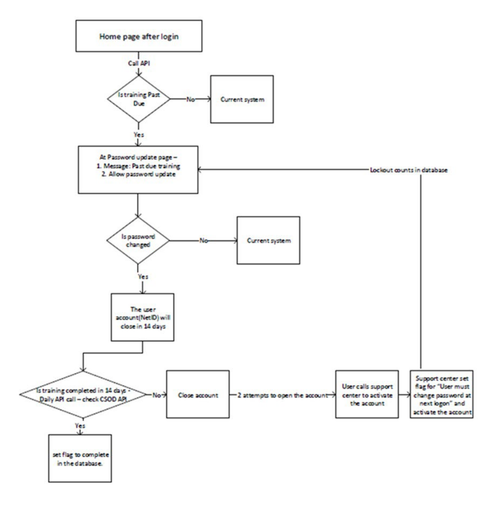
Figure 3 – Logical Code Flow Using the Cornerstone API
Logical Code Flow Using the Cornerstone API
This flowchart describes a process for enforcing required training completion through password changes, account monitoring, and account closure.
After a user logs in and reaches the home page, the system calls an API to determine whether the user’s training is past due.
- Decision: Is training past due?
- No: The user continues to the current system without interruption.
- Yes: The user is redirected to a password update page that:
- Displays a message indicating training is past due.
- Allows the user to change their password.
- Decision: Is password changed?
- No: The user returns to the current system.
- Yes: The user’s NetID account is marked to close in 14 days.
- During the 14-day period, a daily API call checks the Cornerstone OnDemand (CSOD) training system to determine whether the required training has been completed.
- Decision: Is training completed within 14 days?
- Yes: A completion flag is set in the database, and the process ends.
- No: The account is closed.
- After account closure:
- The user receives two attempts to access the account.
- The user contacts the support center to reactivate the account.
- The support center sets a database flag indicating that:
- The account is reactivated.
- The user must change their password at the next login.
- The workflow also notes that lockout counts are stored in the database and are associated with the password update process.
Monitoring and Metrics Collections
A daily report from the university’s LMS is sent to a distribution that includes the IT Risk & Compliance team. This reports the statuses of all users who were assigned to the training. Additionally, a daily report of all lockouts is also sent to the IT Risk & Compliance team.
INPUTS AND OUTPUTS
Inputs
- Criteria for selecting a set of users to administer the General ITSAT.
- Criteria for selecting a set of users to administer the Role-Based ITSAT. This includes the technical modules and the Highly Sensitive Data (HSD) custodian training video.
- Valid and active George Mason NetID and Password.
- Active status for access to the MasonLEAPS platform.
- User not ‘Absent’, i.e., on approved leave status.
- Assigned training.
Outputs
- Certificate(s) of Training Completion
- ITSAT metrics in Cornerstone Learning Management System (LMS) for General ITSAT and Role-Based ITSAT
- Daily report of all training lockouts
REVIEW SCHEDULE
Annually
APPROVAL
Signature by Noor Aarohi, Director, IT Risk & Compliance, on file. (Signed: 9 September 2025)
REVISION HISTORY
| Date | Version Number | Department or Author | Brief Description of Changes |
|---|---|---|---|
| 12/31/2022 | 1.0 | IT Risk & Compliance / Noor Aarohi | EOY date for the previous version before moving the content to the new template and update. |
| 1/27/2023 | 2.0 | IT Risk & Compliance / Noor Aarohi | ITS.ITSO-PRS005 was retired and replaced with this document. Ownership changed from ITSO to ITS > IT Risk & Compliance. |
| 3/24/2023 | 2.1 | IT Risk & Compliance / Noor Aarohi | Appendix A has been updated by adding the Optional TDX Ticket information and revising the Note section to add hyperlinks to Exceptions and Optional tracking. |
| 3/27/2023 | 2.2 | IT Risk & Compliance / Noor Aarohi | Minor typo corrections. |
| 11/30/2023 | 2.3 | IT Risk & Compliance / Noor Aarohi | Updated DCN as a result of a change to process ownership and minor updates |
| 8/30/2024 | 2.4 | IT Risk & Compliance / Noor Aarohi | Updates to incorporate the new compliance enforcement method (Project #854) |
| 9/9/2024 | Portfolio & Project Management Office / John McShea | Added Process steps for non-compliant account enabling/disabling and remedies to ensure compliance enforcement method is managed. |
|
| 9/18/2024 | IT Risk & Compliance / Cindy Kim | Updated document using the new George Mason logo, colors, and editorial specifications. Added new acronyms to the table. |
|
| 9/5/2025 | 2.5 | IT Risk & Compliance / Noor Aarohi | Annual review and minor edits. |
RELATED DOCUMENTS/REFERENCES
ITS Support Desk Account Disabling/Re-enabling (Process)