
Copilot Premium Adoption
See how faculty and staff are using their Copilot Premium licenses (period: October 1- 28, 2026).

Copilot Premium License Distribution Update (updated October 29, 2026)
Copilot Premium licenses are currently being distributed to users in roles that university leadership reviewed and approved for access. If you are in one of these roles, you will receive information about next steps.
- If you did not directly receive an invitation to claim a license, completing the orientation and/or survey will not give you access to a license. Please do not forward an invitation.
- If you were invited and completed the prerequisites, please allow 3–5 days for provisioning. You will receive a confirmation email when it is complete.
If you do not receive a notification, you will have an opportunity to request a license. The request option is expected to become available by November 15, 2026. Details will be shared when requests open.
Early cohorts allowed an opportunity to test the onboarding process, collect baseline and usage data, understand where users see value and where they encounter barriers, and refine the experience before distributing licenses at much greater scale. “Wave 3” is where the transition initial implementation cohorts to a much broader, role-based approach.
This role-based selection process is designed to align access with where the technology can provide the greatest value. The approach is grounded in Microsoft research, industry best practices, higher education experience, and an analysis of university roles and common work activities to identify where Copilot capabilities align with day-to-day responsibilities.
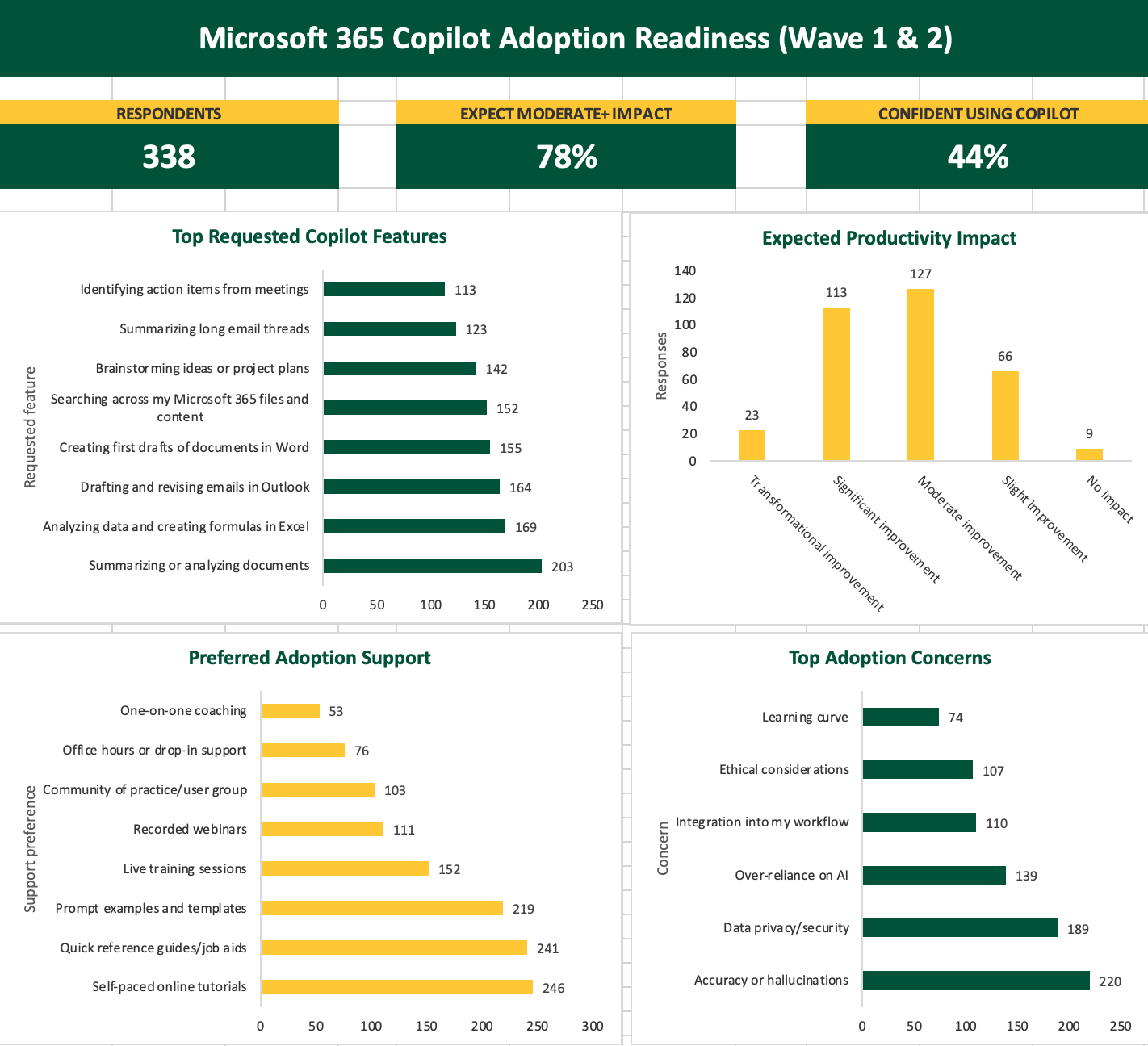
Baseline Data – Wave 1 & 2
This resource center brings together expert-led video tutorials, specialized guides, and free learning courses to help you get the most from Copilot for Microsoft 365.
Training
Copilot in Outlook
Copilot in Teams
Prompting
Effective prompting is the key to getting more useful, relevant results from Copilot. Explore the Art of Prompting resources below for practical guidance, videos, examples, and tools to help you build stronger prompts and get more from your AI interactions.
- Microsoft Copilot Prompt Gallery (must be signed in)
- Mastering Prompt Engineering Webinar Recording (Evolve 365)
- AI Community of Practice Prompt Library (coming soon!)
Copilot Premium Use Cases
For George Mason users, the Copilot value lens focuses on practical, role-based work across three primary rollout groups: Faculty, Staff, and Research.
- Faculty: Copilot can support course preparation, student communications, meeting follow-up, literature synthesis, and the creation of teaching materials.
- Staff: Copilot can reduce friction in high-volume email, meeting notes, reporting, document drafting, coordination, and service delivery.
- Researchers: Copilot can help organize proposal inputs, summarize literature, draft sponsor or collaborator communications, prepare progress updates, and support research administration workflows.
Across all three groups, the goal is to target work that is repetitive, time-consuming, or difficult to pull together, while keeping final judgment, review, and decision-making with George Mason users.
These use cases focus on teaching, research, curriculum design, academic leadership, content creation, synthesis, and communication.
Faculty USE CASES
- Draft and revise syllabi, assignment prompts, rubrics, and lecture outlines from existing course materials in OneDrive or Teams. Documents
- Summarize long student email threads and draft responses in the instructor’s own tone, ready for review. Email
- Produce first pass literature summaries and reading lists for course preparation and scholarship. Research
- Turn lecture notes and recorded sessions into study guides, practice questions, and accessible alternatives. Documents
- Recap committee meetings into decisions, action items, and draft minutes. Meetings
- Draft program review narratives, annual activity reports, and accreditation self study sections. Reporting
academic leadership USE CASES
- Assemble course scheduling summaries and teaching assignment drafts each term. Coordination
- Draft faculty review letters and promotion case summaries from submitted materials for the chair’s edit. Documents
- Produce department annual report drafts from activity data and prior reports. Reporting
- Recap department meetings and faculty searches into action items. Meetings
- Triage the inbox with priority summaries and drafted replies held for review. Email
- Build meeting preparation briefs from calendar, recent threads, and shared documents. Meetings
- Convert strategy documents into presentation drafts and audience specific summaries. Documents
- Summarize division reports into a one page leadership update. Reporting
- Track commitments made in meetings and email and surface what is due. Coordination
instructional design, library use cases
- Build module outlines, learning objectives, and assessment alignment from faculty source content. Documents
- Draft accessibility remediation text, alt text, and transcript cleanup. Documents
- Create faculty facing job aids, training scripts, and quick reference guides. Documents
- Draft research guides, collection descriptions, and finding aid narratives. Documents
- Draft reference responses and instruction session follow ups. Email
- Build workshop content and tutorials for information literacy sessions. Documents
- Summarize usage and collection data into departmental reports. Reporting
- Summarize division reports into a one page leadership update. Reporting
- Track commitments made in meetings and email and surface what is due. Coordination
Administrative Staff Roles
These use cases support institutional operations, services, and strategic initiatives through frequent collaboration, communication, reporting, and coordination. Common activities include managing email, meetings, documents, data, and workflows across the organization.
DIRECTORS & MANAGERS use cases
- Recap team meetings with decisions, owners, and due dates. Meetings
- Draft operational reports and narratives for dashboards and leadership updates. Reporting
- Draft staff communications, policy rollout notes, and responses to escalations. Email
- Synthesize project status across email, Teams, and shared files. Coordination
- Draft performance documentation and position descriptions for review. Documents
ADMINISTRATION AND PROGRAM COORDINATORS use cases
- Coordinate calendars and scheduling with drafted confirmations. Coordination
- Produce meeting notes and event logistics documents. Meetings
- Draft standard responses to recurring student, faculty, and vendor inquiries. Email
- Write purchasing request justifications and process documentation. Documents
- Maintain checklists and onboarding packets for the unit. Documents
HUMAN RESOURCES & COMPLIANCE use cases
- Draft policy summaries and employee facing FAQs. Documents
- Standardize onboarding materials and job descriptions. Documents
- Structure case documentation and investigation summaries for review. Documents
- Draft workforce communications and benefits enrollment reminders. Email
- Summarize workforce data into leadership updates. Reporting
Information technology Use cases
- Draft knowledge base articles from ticket history and resolution notes. Documents
- Write runbooks, change records, and incident summaries. Documents
- Draft service announcements and user facing guidance. Email
- Summarize project and vendor threads into status updates. Coordination
- Explain scripts and configuration files and draft inline documentation. Documents
enrollment and records use cases
- Draft high volume applicant and student responses from approved templates. Email
- Draft policy and deadline communications to cohorts. Email
- Answer transfer credit and records inquiries grounded in catalog language. Documents
- Build recruitment event materials and information session content. Documents
- Summarize application and enrollment activity for weekly updates. Reporting
academic and student advising use cases
- Summarize advising sessions and draft follow up emails to students. Meetings
- Explain degree progress and requirements in plain language. Documents
- Draft outreach campaigns for at risk cohorts and registration reminders. Email
- Create career resource content and employer correspondence. Documents
- Summarize caseload activity for supervisors. Reporting
These roles support sponsored research, proposal development, research administration, reporting, and laboratory operations.
RESEARCH USE CASES
- Draft proposal narratives, specific aims, and broader impacts sections from prior submissions. Research
- Synthesize literature across large document sets and identify gaps. Research
- Draft progress reports, sponsor updates, and compliance documentation. Reporting
- Recap lab meetings into shared action tracking across collaborators. Meetings
- Draft sponsor and collaborator correspondence with the right level of formality. Email
- Draft sponsor correspondence and department notifications. Email
- Assemble compliance checklists and budget justification narratives. Documents
- Summarize effort reporting and award status for principal investigators. Reporting
- Answer policy questions grounded in institutional and sponsor guidance documents. Documents
- Track proposal deadlines and document assembly across multiple submissions. Coordination